Showing posts with label Geekinners. Show all posts

Monday, July 22, 2013

[Review] Raspberry Pi

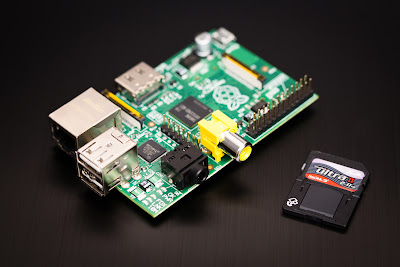
The Raspberry Pi is a credit-card sized computer that plugs into your TV and a keyboard. It’s a capable little PC which can be used for many of the things that your desktop PC does, like spreadsheets, word-processing and games. It also plays high-definition video.

The Raspberry Pi has a broadcom ship which include a 700 MHz processor(can be overclocked up to 1GHz) ,VideoCore IV GPU ,512 MB of RAM, HDMI port for connecting a digital TV or monitor , RCA port for an analogue TV or display , an audio jack , 2 USB ports and an Ethernet port to connect to a wired network.it does not include a built-in hard disk but it uses an SD card.
But the hardware alone is only one side of the story you still need to run an operating system ,the raspberry pi supports Fedora, Debian and Archlinux  and also the Raspbian which is a Debian based OS optimized for the Raspberry Pi hardware
The Raspberry Pi model A costs 25$ and the model B costs $35.


Saturday, July 20, 2013

[Tutorial]How to Use Proxies

Before you can connect to your internet , your computer must first be assigned an IP address.
How does your computer get its IP address? , well it 's assigned by the Dynamic Host Configuration Protocol a service running on the network. DHCP typically runs on network hardware such as routers.
An IP address function like an actual address because it tells exact location of your computer , this is the main reason why you can't access some websites or watch some videos if you are not connected from some specific locations likes US or UK...What is worse then that is someone get to know your IP address and  maybe he can manage to get access to your computer.
If you don't want websites and potential hackers know your location then one way to hide is by using a proxy . A proxy ip is an IP address of a server which filters all your internet traffic by using a different IP address so your real IP address is hiding , this method can prevent your computer from being traced and it's also a good way for accessing country specific sites without actually having to be in that country!

There are multiply ways to setup a proxy , the easiest way is to surf internet threw proxy site such as
proxify or hide my ass all you have to do is type the website click the button and you can view that website without they know your real IP address . To check if the proxy is working , first you need to know you real IP address for that you can go to this site what is my IP address and it will show your current IP address and your location then visit it again but using hide my ass and you will see that it shows a completely different IP address and a different location
Another way is by installing add-ins, there is the Foxy Proxy add-in for Mozilla Firefox and proxy switchy for Google chrome , go to the settings of the add-in and enter a proxy IP address to use, hide my ass provides a list of ip adresses and their ports.


Thursday, July 18, 2013

[Tutorial]How To Create Your Own Tablet Stylus !!

Hey Guys , How are things ? Well I've Came back with a new stunning new tutorial for you guys who don't have a stylus for their tablets/Smartphones , well those new , good quality tablets don't allow you use to the touch screen with anything unless you're using your fingers (flesh) what makes using any stylus impossible  So what's the trick for this .
As Everything on earth there's a hack for this one , and it's simple. those touch screens are sensible to the material that chips bags are made of , take any chips bag (snack bag in general) and wrap any pen with it , secure it with a rubber band and use it as a stylus for your precious tablet/smartphone , A TIP : Wrap just the pen cap so it will still be usable . Now What you have to do is to enjoy your new invention and wait for a tutorial where I'll show you how to use your Tablet/Smartphone as a touch pad  for your pc , so you can use in your graphic design or whatever you are doing !
Good Luck Guys , Geekinners, We Are Beginners !


Tuesday, July 16, 2013

[Overview] Introduction To Algorithm in Computer Programming

To make a Computer do anything, you have to write a computer program. To write a computer program, you have to tell the computer, step by step, exactly what you want it to do. The computer then "executes" the program, following each step  to accomplish the end goal.

When you are telling the computer what to do, you also get to choose how it's going to do it. That's where computer algorithms come in .

An algorithm is a set of instructions, sometimes called a procedure or a function, that is used to perform a certain task. This can be a simple process, such as adding two numbers together, or a complex function, such as adding effects to an image.
 
Here is an  algorithm show step by step  how to add  two numbers entered by user :
 step 1:start
step 2:declare variables num1,num2,sum
step 3: read values num1 and num2
step 4:add num1 and num2 and assign the result to sum. sum=num1+num2
step 5: display sum
step 6:stop
Step 1: Start Step 2: Declare variables num1, num2 and sum. Step 3: Read values num1 and num2. Step 4: Add num1 and num2 and assign the result to sum. sum←num1+num2 Step 5: Display sum Step 6: Stop - See more at: http://www.programiz.com/article/algorithm-programming#sthash.2WL5JVex.dpuf
to add two numbers entered by user


Monday, July 15, 2013

Galaxy S4 vs HTC One vs Iphone 5

Apple, Samsung and HTC are three of the biggest names in the smartphone world. If you're trying to decide between these three phones then you've come to the right place.


Three of the biggest smartphones on the market are the Galaxy S4, iPhone and HTC One,so if we put them in a comparison against each other, which of these tree will be the best?

Comparing the prices, The iphone 5 costs $199 (16GB,on contract) while the S4 costs $589.99 for the 16GB model According to http://www.amazon.com/ .And finally the HTC One will cost you $659.99 .
So as we see clelarly that HTC One and Galaxy S4 are very expensive than the iphone 5 .. Let s see why :
- A larger Screen: the S4 with a 5 inch SUPER HD , and One with 4.7 inch ,1080p super LCD3 , while a 4 inch Retina Display on The Iphone5 .

-A better processor : the S4 and One with a QUAD CORE processor ;1.6ghz for the samsung produ and 1.7ghz for the HTC while the iphone 5 with A dual core processor.

-A better front camera : the S4 and One with 2 and 2.1 megapixel front camera and the ios with only 1.2 megapixel(HD 720p).

-A better Rear camera :  the S4 with 13 megapixel,simultaneous HD video and image recording,geo-tagging,face detection,optical image stabilization,autofocus and LED flash and the possibilty to use rear and front camera at the same time! then there is One with 4 megapixel Ultrapixel camera with the same features as the S4 ,meanwhile the ios with a 8 megapixel autofocus also with flash and HDR ,native face detector and a panorama mode.

-A better Memory :  the S4 and One  both with a 2GB memory and the iphone 5 with only 1GB.

NFC included in the S4 and One and not in the ios.


So as a first conclusion the two Android devices are way better than the iphone 5. Now let' s see which one of those Androids is the Best : 

The S4 has more and better Camera features than the HTC One and also it has a Wireless Charging which is unfortunately unavailable on One ,it also packs in more battery power at 2600 mAh and it s thinner and lighter than its Taiwanese competitor. 

As a final conclusion , The GALAXY S4 is the best smartphone available on the market !

Thank you all for reading this ,keep yourself updated on all the latest from Microsoft, Google, Apple and the web.


Sunday, July 14, 2013

[News] Rovio Releases "Tiny Thief" for android and IOS

Rovio Stars has released a new game called Tiny Thief for IOS and Android devices.

Tiny Thief is a medieval adventure game about a Thief who uses tricky ways to outsmart  his opponents across six quests
and save a princess and her   kingdom from danger. Along the way, players will square off against enemies like the Dark Knight, rogue pirates, dragons ....

Gamers can pick up Tiny Thief  in the App store or google play for $3.51 .

check out the video below.


A great deal !

Hey there , Today we are going to talk about A Sweet deal that Amazon offered . It s about HTC ONE that costs only $49.99 .
Nowadays , the HTC One is one of the best and most prefered smartphones . With a sleek body , a live home screen streaming all your favourite contents , an extraodinary camera and imaging tools makes it one of the best Android devices on the market . So if you re looking for a new smartphone we'd recommand it to you !
Here are some informations about This gorgeous HTC One

HTC BoomSound ™: Two stereo speakers on the front
Design piece all aluminum - screen 4.7'' Full HD
HTC Zoe ™: New animated Ultrapixel sensor and image gallery for your memories come to life
Quad Core Processor 1.7GHz
4G network (up to 100Mb / s) and Dual Carrier (up to 42Mb / s)
 
Thank you all for your support !


Friday, June 28, 2013

[Overview]Storage Devices

Hard Drive (HDD)

   A hard drive is one of the most common storage devices we’ll find in our computers, because they store such a large amount of data. There are a lot of different kinds of hard drive formats , there is a SATA hard drive , PATA hard dive and a SCSI hard drive , they are storing and retrieving the same amount of data the big difference between them  the interfaces that we use to access each one of these storage devices . You wouldn’t normally remove the cover of a hard drive because any type of dust is going to damage the drive itself.

Now let's look at what is  inside a hard drive !

    First you can see the platter, and usually there are multiple platters that are spinning. And they’re spinning around this spindle that’s in the middle, and they’re going at a very, very high rate of speed. You have this actuator on the hard drive that controls this arm, so that it can move back and forth. The platters themselves are spinning very, very quickly on hard drives that we might have at home. They might be at 7200 RPM (round per minute )and slower.

   For enterprise environments, it’s very common to see hard drives that would run at 10,000, or even 15,000 rotations per minute. And as you can see by these latency numbers, the faster the spin, the faster you can get the data. As the drive goes a little bit slower to 7,200 and down to 4,800, you can see that your latency gets slower and slower. 

Solid State Drive (SSD)

   One of the newest technologies is one called SSD. That stands for solid state drives.
   

   We don’t have a spinning platter like we see in the picture above. Instead, there’s no platter at all. It is completely solid state. There’s no moving parts. It’s all memory inside of this device We simply will read and write memory. And it’s very, very fast in how it works. One of the challenges with this is that currently this is an emerging technology, and it still expensive !

Optical Fomats

Another common type of storage media on our devices are optical formats. We have everything from CD ROMs to DVD ROMs, to Blu-ray discs that we use these days, but they all tend to work exactly the same way however every one of these has it 's own capacity of storage :
  • CD (compact disc) : 700 MB capacity
  • DVD (digital virsatil disc) : 4.7 GB for single layer and 8.5 GB for dual layer
  • Blu-ray: 25 GB for single layer and 50 GB for dual layer

Removable storage-flash memory 

  • Micro SD

          Micro SD is used for storing digital information  they are commonly used  in many     electronic devices like digital camera , mobile phones , laptop , mp3 player and video game consoles they are small and able to maintain data without power


  • USB flash  drive

    USB flash drives are typically removable and rewritable, and physically much smaller than a floppy disk , USB flash drives are often used for the same purposes for which floppy disks or CD-ROMs were used, i.e., for storage, back-up and transfer of computer files. They are smaller, faster

  • External removable HDDs 

            External removable HDDs typically connect via USB.Plug and Play drive functionality offers system compatibility, and features large storage options and portable design. their capacities generally range from 160GB to 2TB. Common sizes are 160GB, 250GB, 320GB, 500GB, 640GB, 750GB, 1TB, and 2TB


    THAT IS ALL FOR NOW DON'T FORGET TO RATE ,COMMENT AND SHARE WITH YOUR FRIENDS
    GEEKINNERS ,WE ARE BEGINNERS !


Thursday, June 20, 2013

[News] Instagram reveils the video feature


Now Instagram users have  a new way to express themselves on the popular social networking site through video , When you go to take a photo on Instagram, you’ll now see a movie camera icon. Tap it to enter video mode, where you can take up to fifteen seconds of video through the Instagram
camera.You also find some new filters built for videos for sharing a beautiful content on instagram


Geekinners , we are beginners


[Tutorial] Hiren's Boot CD

Hi Geekinners !
   Welcome to a new tutorial , where I introduce you Hiren's Boot CD .Maybe you are wondering what is Hiren's Boot CD ? ,well Hiren's Boot CD is one of the most useful tools used by many computer technicians and administrators , It is a free bootable software CD containing a number of diagnostic programs and utilities for fixing various computer problems and It is mostly used for troubleshooting problems in windows and Linux.
   The Hiren's Boot CD is an ISO image zipped which can be burned to a CD or USB flash drive for use in computers that support booting  from USB

Note: To see all the utilities the Hiren's CD has click here
           To download Hiren's Boot CD v15.2 click here

How to run  Hiren's Boot CD from USB: 

what do you need :
  • The Hiren's Boot CD v15.2
  •  USB storage from 4 GB or more
  • Rufus for making the USB bootable 
Prepare The USB:
  1. plug the USB into the Computer  then format it after you copy all the data from your USB to a folder in your computer (backup)
  2. extract the ISO file of Hiren's boot CD from the zip you have downloaded
  3. run Rufus as administrator
  4. click the select box of the device (1) and select your USB
  5. make sure that all your options match all options  in the image above
  6. click the CD icon (2) and specify the path of the ISO file
  7. then click start and wait some minutes 
  8. now we have prepared a bootable USB with Hiren's CD software
Boot From the USB:

Now plug the USB and restart your computer, to make sure the computer will boot from the USB:
Enter the BIOS press the "Del" button on your keyboard. Alternatives are "F1", "F2", "Insert", and "F10". Some PC's BIOS might even require a different key to be pressed. Commonly a PC will show a message like "Press [Del] to enter Setup" to indicate that you need to press the "Del" key after you enter the setup a list will be shown choose boot from USB and now enjoy !

Geekinners, We are Beginners !


[Review] Razer Blade : The world's thinnest gaming laptop

   Razer announced on the Computex2013 event earlier their latest gaming notebook, the Razer Blade Pro and 14-inch Razer Blade.
   The designers and engineers of Razer Blade took the thin and light form factor of  Mac Book Air and the ultra-books  and they combined with the performance of a really powerful gaming laptop in a single laptop with a 0.66 in thickness (ultra-thin profile , thinner than a dim) and has the best gaming performance in its class.


Tech Specs

  •  The Latest intel core i7 processor
    The razer blade come with 4th gen i7 core processor gives the 14 in razer blade 2.2 GHz of quad core processing power and turbo boost speed which automatically increases of active cores up to 3.2 GHz 
  •  Nvidia Geforce graphics
   With the latest Nvidia Geforce GTX 756M (2 GB GDDR5 VRAM ,Optimus technology ) graphics you will play the most graphics intensive games

  • Fast Memory, Fast Storage
    The razer blade features 8 GB of fast DDR3L memory combined with the fastest performance of up to 512 GB of storage

  • Ready to plug and play 
   The razer blade is equipped with 3xUSB 3.0 ports ready to  be plugged with various devices , an HDMI port to be connected to an HDTV display , Dolby home theater v4 for a good quality sound audio, a high capacity battery for extend hours of gameplay and armed with  a Bluetooth 4.0 connectivity and a Killer wireless card for gaming online


That's all for now !

 Geekinners, We are Beginners !

gives the 14-inch Razer Blade 2.2GHz of quad core processing power and Turbo Boost speeds, which automatically increases the speed of active cores - up to 3.2GHz - See more at: http://www.razerzone.com/gaming-systems/razer-blade#sthash.8xZp86g5.dpuf
The future 4th gen Intel® Core™ processor, gives the 14-inch Razer Blade 2.2GHz of quad core processing power and Turbo Boost speeds, which automatically increases the speed of active cores - up to 3.2GHz. Thanks to Hyper-Threading technology, you’ll experience eight virtual cores for insane gaming performance. - See more at: http://www.razerzone.com/gaming-systems/razer-blade#sthash.8xZp86g5.dpuf
crafted from aluminum, and the best gaming performance in its class - See more at: http://www.razerzone.com/gaming-systems/razer-blade#sthash.8xZp86g5.dpuf
With a 0.66-in. ultra-thin profile, crafted from aluminum, and the best gaming performance in its class - See more at: http://www.razerzone.com/gaming-systems/razer-blade#sthash.8xZp86g5.dpuf


[News] Samsung Kill Switch

Hey Geekinners , Samsung Now is working on a new project
called "Kill Switch" , the basic intention from it is to kill a smartphone
 when it's stolen , It will Give people the ability to kill their smartphone
by making it useless when they lose  it . we don't know much about
 it but we'll give you more information as soon as we get some .
Like Our facebook page on your right , and share this post with you friends .
Geekinners, We are Beginners !


[Review] Shazam App

Hey Geekinners , Most Of you had heard music on the radio or somewhere else on the street and wanted to know the name of the Track and the singer , well Shazam Is a killer way to do it even when you're not connected to the internet , how does the application work ? it basicly records a short piece of the track (Some Seconds) and match it with it's huge DataBase .
If you're not Connected to the internet , the app will save the recorded part and when you're on wifi or 3G you reload it and it gives you :
  • The Title
  • The singer's name
  • The album
  • lyrics (Sometime)
  • The Youtube Videos 
  • And more
As I said this app has anything you want , if you want to share a song you can simply share it with your friends on facebook via the shazam app , without forgetting that the app shows you the most tagged songs in a chart .
If you Want to buy any song Shazam gives you the ability of buy it from amazon with a simple button click .
So Go now and Download it for :


  • Android :  Click Here!  Or Scan This QR Code directly from Your Android Smartphone 


  • IOS : Click Here!  Or Scan This QR code directly from your IOS Smartphone


So this is all for now Hope you like this article and Share it with your friends , don't forget to like our Page on the Social network "Facebook" on your right , If you have any questions or suggestion leave it on our facebook inbox .
Geekinners, we are Beginners ! 


[HotNews] Qualcomm Will Work With Microsoft

Hey Geekinners  In an earlier Article On Cnet.com , Don Reisinger said "Microsoft and Qualcomm will work together on the next generation of Surface RT devices, a new report claims."
What means that Microsoft is planning to put the qualcomm's snapdragon processor on it's new versions of Surface RT , that's a good news now that We've noticed that Qualcomm is making processor for most new Smartphones and tablets , a qualcomm processor on the Surface tablet running Windows 8.1 (in the future) Will give users a great experience .
Qualcomm announced that the snapdragon processor will be on windows 8.1 tablets but it didn't confirm that it will be on the next Surface what is a bit shocking .
Geekinners, We are beginners !


Wednesday, June 19, 2013

Have A Great Summer Geekinners

Hi everybody .. How are you ? It s summer time and for most people it s boring lifetime .. We all during school wait with no patient to rest and enjoy the summer , but as soon as we fnish scholl and just after the first 2 or 3 weeks , we find our selves so bored doing nothing . So why don t we change this to make our summer just PERFECT?
I have some ideas for you :
First of all , just a few days after finishing school , take a notebook and pencil ; invite some friends to your house or meet in a cafe ; then right within each day after consulting your mates , some plans , some activities , desires , sports and whatever will make you enjoy the summer . This operation is simple and easy and i m sure it will get roud of all the boredom in your summer.
As a second idea , why not to start studying some subjects off topic like networking , HTML , CSS , JAVASCRIPT and more (notice that we have in our blog some e books about it) or surf the web and search for the world s conspiracies and meet new people . I know it ll seem boring at first , but just after clicking on some links and reading , i m sure you ll have a great time.
After all , Thanks for reading this article ,GOOD LUCK every body
Have a great Vacation


[Review] Apple IOS 7

  Apple announced at WWDC event  the new IOS 7 which is the biggest change in IOS since the introduction of Iphone . As soon as you grab an iPhone running IOS 7, things will feel different !

Note: click the images to see it in it's original size

All-new Design:

    Apple engineers and design artists have introduced  a cleaner  and customizable interface more then ever , IOS 7 is a pure representation of simplicity . It has a new structure, applied across the whole system, that brings clarity to the entire experience , icons and apps look like leather or paper or felt . Flat graphics and a dappled, pastel color scheme bring an elegant look. When you move the phone or tablet, Apple promises a 3D effect that makes your wallpaper appear some distance behind the icons.

 The overall look is completely different across the board . but even though it looks completely different, it's still easy to pick up and use right away because the core functionality is largely the same.


  All-new Features :

   IOS 7 introduces great new features like Control Center, AirDrop for IOS 7, and smarter multitasking. It also makes the things you do every day even easier, faster, and more enjoyable
  •   Control Center and Notifications:  
    Control Center gives you quick access to  the controls and apps you always use ,just swipe up from the bottom of the display to bring up quick-access tools, like a Wi-Fi meter, brightness, Airplane mode, music controls, and more.
 

     Notification center  show you all your alerts , new mails , missing calls and messages and a new feature called Today which tracks what you do over the day , just swipe down form the top of the display to bring up the Notification center
  • Multitasking :
   Multitasking has been always a way to switch between apps and close an app , double-tapping the home screen brings up your open apps , because  IOS 7 knows which apps you open frequently , it tends to update them first  most the time  ,"A smarter way to multitask and intellegently way to update".


  • Camera : 
  Camera  app lists all your shooting mode  such as panorama , video , square , still and provided you many filters to apply them to your shots . Now Apple treats  photos as collections, moments, and years(smart groupings of your photos and videos based on time and place) ,so when you have thousands of photos in your smartphone  in place of scliding your finger between them you can just zoom out and see your photos from year to year .


  •    AirDrop :
  Airdrop is a peer-to-peer file sharing , AirDrop let you quickly and easily  share videos , photos , contacts and anything else . So if you want to share a photo, you'll hit the share button, and automatically see others around you who are also on IOS 7. From their you just tap a friend's picture and IOS 7 uses Wi-fi and Bluetooth to send your photo.

  •    Safari :
    An all-new redesigned browser with an enhanced  user interface and functionality , the biggest change to the browser is a unified search and URL field .There's more flexibility with browser tabs as well, the navigation bars also disappear until you need them so you see more content than ever on your screen.
  •  Itunes Radio :
   iTunes Radio features streaming radio stations you’ll love from day one — from the best selection of music. The more you listen, the more personalized it becomes. And it’s available on the iPhone, iPad, iPod touch, Mac, PC, and Apple TV for free .

  • Siri:
Siri the digital voice assistant gets some more personality in IOS 7 ,"she" has a new look , a new sound , A clearer, more natural-sounding female or male voice makes Siri even easier to understand. A new sound wave animation appears at the bottom of the screen when you speak, and Siri 's results come up in full screen . It’s faster at answering questions and it checks more sources, such as Bing, Wikipedia, and Twitter . Now Siri can do actions on the phone's system settings like turn on Bluetooth , increase the brightness and so on
Well this is everything for now
Geekinners, We are Beginners !



Tuesday, June 18, 2013

[Review] Adobe Photoshop CC

"New Photoshop CC. Look sharper , Work smarter" , A title chosen by Adobe for it's new release : Photoshop CC , A new way for designers to work , it allows them to have the latest photoshop updates and future features directly from Adobe Creative Cloud , plus new extended features giving photographers and designers a great experience .


#1 Gaming News

Hey there Geekinners Today we are gonning talk about some latest video games rumours and official releases .
Let's start with some news:


 FIFA 14


Just days ago EASPORTS released the official releasing date which is the 27th September 2013 in Europe and the 24th in the U.S . All FIFA games are historically known by competitive playing and withing each new game .. more possibilities that makes the gamer closer to the game and gets him to discover   new innovations in gameplay repeatedly acclaimed , creating new techniques and meeting new friends on the EA SPORTS Football club which is a social network of football where fans can connect, compete and share with millions of users around the world.

That is all for FIFA 14

Let s see some other news:


                                                    The last of us

This is the top sold game for now ,released on last Friday .It s an horror survival action game on PS3 that tells the story of Joel and Ellie who will have to help each other to survive in the face of a mysterious plague that has decimated the United States. It s on Fnac.com for all PS3 Gamers Hope you enjoy it !


[Tutorial] How to create a basic web server on your Smartphone

Hey guys  ! lot of you wanted to have their own website on their own servers without having to pay for a Hosting plan , but you can't leave your computer on all the time , I'll ask you a question , do you leave your phone turned on  for the whole day ? the answer will probably be YES ! so why don't you use your phone instead of a computer to create your server and start your website ? we have the answer for this question ..


Monday, June 17, 2013

Computing Basics

Computing Basics

     At the most basic level, a computer has three functions: input, processing, and output.
It accepts input, performs some processing, and provides an output, as shown in Figure
This is often shortened to just input/output (I/O).


  • Input : User provide information from keyboard , mouse or even touchscreen. Sometimes input is provided by other sources like a disk drive when opening files , or a network interface card (NIC) when receiving data.
  • Processing : The computer responds to the input by completing an action . the central power unit (CPU) is the brain of the computer it does the processing and it uses random access memory(RAM) to store data and manipulate it.

  • Output :  Output is commonly provided to a screen or printer , however computers also provide output to other destinations like speakers and headphones to play sound or NIC to send data over the internet.
   For example, imagine you wanted  to open a Microsoft word file where you keep your notes , you  would start by double-clicking the document using your mouse as your input , the computer processes your double-clicking:
  1. It identifies the extension of the Microsoft Word file (.doc or .docx). It recognizes that
    this extension is associated with Microsoft Word.
  2.  It locates and retrieves the Microsoft Word program from the disk drive and begins
    moving the program from the disk drive to memory.
  3. When the program is in memory, the computer can actually run it.
  4. The computer begins sending results to the graphics card, showing the process of
    Microsoft Word starting.
  5. When Microsoft Word is in memory and started, the computer locates the Word Study
    Notes file and moves it from the hard drive to memory.
  6. When the file is in memory, the computer begins sending results to the graphics card.   
  

Note :
   Computer troubleshooting can often be reduced to identifying what is not working: input,
processing, or output (IPO). When you identify this, it’s much easier to troubleshoot and
resolve the problem.


Comment Here !