Showing posts with label Os. Show all posts

Monday, July 22, 2013

[Review] Raspberry Pi

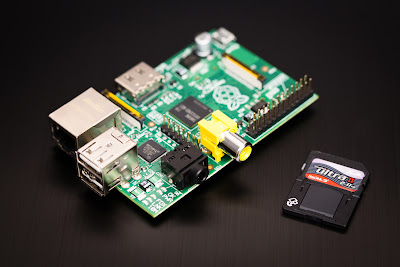
The Raspberry Pi is a credit-card sized computer that plugs into your TV and a keyboard. It’s a capable little PC which can be used for many of the things that your desktop PC does, like spreadsheets, word-processing and games. It also plays high-definition video.

The Raspberry Pi has a broadcom ship which include a 700 MHz processor(can be overclocked up to 1GHz) ,VideoCore IV GPU ,512 MB of RAM, HDMI port for connecting a digital TV or monitor , RCA port for an analogue TV or display , an audio jack , 2 USB ports and an Ethernet port to connect to a wired network.it does not include a built-in hard disk but it uses an SD card.
But the hardware alone is only one side of the story you still need to run an operating system ,the raspberry pi supports Fedora, Debian and Archlinux  and also the Raspbian which is a Debian based OS optimized for the Raspberry Pi hardware
The Raspberry Pi model A costs 25$ and the model B costs $35.


Monday, July 15, 2013

Galaxy S4 vs HTC One vs Iphone 5

Apple, Samsung and HTC are three of the biggest names in the smartphone world. If you're trying to decide between these three phones then you've come to the right place.


Three of the biggest smartphones on the market are the Galaxy S4, iPhone and HTC One,so if we put them in a comparison against each other, which of these tree will be the best?

Comparing the prices, The iphone 5 costs $199 (16GB,on contract) while the S4 costs $589.99 for the 16GB model According to http://www.amazon.com/ .And finally the HTC One will cost you $659.99 .
So as we see clelarly that HTC One and Galaxy S4 are very expensive than the iphone 5 .. Let s see why :
- A larger Screen: the S4 with a 5 inch SUPER HD , and One with 4.7 inch ,1080p super LCD3 , while a 4 inch Retina Display on The Iphone5 .

-A better processor : the S4 and One with a QUAD CORE processor ;1.6ghz for the samsung produ and 1.7ghz for the HTC while the iphone 5 with A dual core processor.

-A better front camera : the S4 and One with 2 and 2.1 megapixel front camera and the ios with only 1.2 megapixel(HD 720p).

-A better Rear camera :  the S4 with 13 megapixel,simultaneous HD video and image recording,geo-tagging,face detection,optical image stabilization,autofocus and LED flash and the possibilty to use rear and front camera at the same time! then there is One with 4 megapixel Ultrapixel camera with the same features as the S4 ,meanwhile the ios with a 8 megapixel autofocus also with flash and HDR ,native face detector and a panorama mode.

-A better Memory :  the S4 and One  both with a 2GB memory and the iphone 5 with only 1GB.

NFC included in the S4 and One and not in the ios.


So as a first conclusion the two Android devices are way better than the iphone 5. Now let' s see which one of those Androids is the Best : 

The S4 has more and better Camera features than the HTC One and also it has a Wireless Charging which is unfortunately unavailable on One ,it also packs in more battery power at 2600 mAh and it s thinner and lighter than its Taiwanese competitor. 

As a final conclusion , The GALAXY S4 is the best smartphone available on the market !

Thank you all for reading this ,keep yourself updated on all the latest from Microsoft, Google, Apple and the web.


Thursday, June 20, 2013

[Tutorial] Hiren's Boot CD

Hi Geekinners !
   Welcome to a new tutorial , where I introduce you Hiren's Boot CD .Maybe you are wondering what is Hiren's Boot CD ? ,well Hiren's Boot CD is one of the most useful tools used by many computer technicians and administrators , It is a free bootable software CD containing a number of diagnostic programs and utilities for fixing various computer problems and It is mostly used for troubleshooting problems in windows and Linux.
   The Hiren's Boot CD is an ISO image zipped which can be burned to a CD or USB flash drive for use in computers that support booting  from USB

Note: To see all the utilities the Hiren's CD has click here
           To download Hiren's Boot CD v15.2 click here

How to run  Hiren's Boot CD from USB: 

what do you need :
  • The Hiren's Boot CD v15.2
  •  USB storage from 4 GB or more
  • Rufus for making the USB bootable 
Prepare The USB:
  1. plug the USB into the Computer  then format it after you copy all the data from your USB to a folder in your computer (backup)
  2. extract the ISO file of Hiren's boot CD from the zip you have downloaded
  3. run Rufus as administrator
  4. click the select box of the device (1) and select your USB
  5. make sure that all your options match all options  in the image above
  6. click the CD icon (2) and specify the path of the ISO file
  7. then click start and wait some minutes 
  8. now we have prepared a bootable USB with Hiren's CD software
Boot From the USB:

Now plug the USB and restart your computer, to make sure the computer will boot from the USB:
Enter the BIOS press the "Del" button on your keyboard. Alternatives are "F1", "F2", "Insert", and "F10". Some PC's BIOS might even require a different key to be pressed. Commonly a PC will show a message like "Press [Del] to enter Setup" to indicate that you need to press the "Del" key after you enter the setup a list will be shown choose boot from USB and now enjoy !

Geekinners, We are Beginners !


[HotNews] Qualcomm Will Work With Microsoft

Hey Geekinners  In an earlier Article On Cnet.com , Don Reisinger said "Microsoft and Qualcomm will work together on the next generation of Surface RT devices, a new report claims."
What means that Microsoft is planning to put the qualcomm's snapdragon processor on it's new versions of Surface RT , that's a good news now that We've noticed that Qualcomm is making processor for most new Smartphones and tablets , a qualcomm processor on the Surface tablet running Windows 8.1 (in the future) Will give users a great experience .
Qualcomm announced that the snapdragon processor will be on windows 8.1 tablets but it didn't confirm that it will be on the next Surface what is a bit shocking .
Geekinners, We are beginners !


Wednesday, June 19, 2013

[Review] Apple IOS 7

  Apple announced at WWDC event  the new IOS 7 which is the biggest change in IOS since the introduction of Iphone . As soon as you grab an iPhone running IOS 7, things will feel different !

Note: click the images to see it in it's original size

All-new Design:

    Apple engineers and design artists have introduced  a cleaner  and customizable interface more then ever , IOS 7 is a pure representation of simplicity . It has a new structure, applied across the whole system, that brings clarity to the entire experience , icons and apps look like leather or paper or felt . Flat graphics and a dappled, pastel color scheme bring an elegant look. When you move the phone or tablet, Apple promises a 3D effect that makes your wallpaper appear some distance behind the icons.

 The overall look is completely different across the board . but even though it looks completely different, it's still easy to pick up and use right away because the core functionality is largely the same.


  All-new Features :

   IOS 7 introduces great new features like Control Center, AirDrop for IOS 7, and smarter multitasking. It also makes the things you do every day even easier, faster, and more enjoyable
  •   Control Center and Notifications:  
    Control Center gives you quick access to  the controls and apps you always use ,just swipe up from the bottom of the display to bring up quick-access tools, like a Wi-Fi meter, brightness, Airplane mode, music controls, and more.
 

     Notification center  show you all your alerts , new mails , missing calls and messages and a new feature called Today which tracks what you do over the day , just swipe down form the top of the display to bring up the Notification center
  • Multitasking :
   Multitasking has been always a way to switch between apps and close an app , double-tapping the home screen brings up your open apps , because  IOS 7 knows which apps you open frequently , it tends to update them first  most the time  ,"A smarter way to multitask and intellegently way to update".


  • Camera : 
  Camera  app lists all your shooting mode  such as panorama , video , square , still and provided you many filters to apply them to your shots . Now Apple treats  photos as collections, moments, and years(smart groupings of your photos and videos based on time and place) ,so when you have thousands of photos in your smartphone  in place of scliding your finger between them you can just zoom out and see your photos from year to year .


  •    AirDrop :
  Airdrop is a peer-to-peer file sharing , AirDrop let you quickly and easily  share videos , photos , contacts and anything else . So if you want to share a photo, you'll hit the share button, and automatically see others around you who are also on IOS 7. From their you just tap a friend's picture and IOS 7 uses Wi-fi and Bluetooth to send your photo.

  •    Safari :
    An all-new redesigned browser with an enhanced  user interface and functionality , the biggest change to the browser is a unified search and URL field .There's more flexibility with browser tabs as well, the navigation bars also disappear until you need them so you see more content than ever on your screen.
  •  Itunes Radio :
   iTunes Radio features streaming radio stations you’ll love from day one — from the best selection of music. The more you listen, the more personalized it becomes. And it’s available on the iPhone, iPad, iPod touch, Mac, PC, and Apple TV for free .

  • Siri:
Siri the digital voice assistant gets some more personality in IOS 7 ,"she" has a new look , a new sound , A clearer, more natural-sounding female or male voice makes Siri even easier to understand. A new sound wave animation appears at the bottom of the screen when you speak, and Siri 's results come up in full screen . It’s faster at answering questions and it checks more sources, such as Bing, Wikipedia, and Twitter . Now Siri can do actions on the phone's system settings like turn on Bluetooth , increase the brightness and so on
Well this is everything for now
Geekinners, We are Beginners !



Comment Here !